





OPCOM Diagnostic Tool for Opel
The OPCOM PIC18F458 CAN‑BUS interface is one of the most powerful and widely used diagnostic tools for Opel and Vauxhall vehicles. Designed specifically for GM/Opel platforms, this dealer‑style diagnostic scanner gives you deep access to vehicle systems that generic OBD2 scanners cannot reach.Built with the reliable FTDI FT232 PIC18F458 chipset combination and supporting CAN‑BUS, ISO9141, and KWP2000 communication protocols, OPCOM allows you to perform advanced diagnostics, coding, module resets, live data monitoring, immobilizer programming, and service functions on most Opel/Vauxhall vehicles from approximately 1990–2021.Unlike many unstable V1.99 clones, this version uses firmware V1.70, which supports proper firmware flashing and significantly better reliability.Whether you’re diagnosing an engine problem, programming a replacement module, resetting service lights, or troubleshooting CAN communication faults, OPCOM delivers dealership‑level access directly from your laptop.✅ Key Features – OPCOM PIC18F458 CAN‑BUS OBD2 for Opel�� Supports Opel Vehicles with CAN‑BUS Works with most Opel/Vauxhall models, including Astra‑H, Zafira‑B, Vectra‑C, Insignia, Corsa, Meriva, Omega, Signum, Antara, and more.⚙️ Firmware Version V1.70 Allows flash firmware updates, unlike unstable V1.99 tools.�� Live Data Monitoring & Output Testing View 8 parameters at once and test vehicle components in real‑time.��️ Full OBD2 Diagnostic Capabilities Read/clear fault codes with full status (present, intermittent), view measuring blocks, and perform advanced diagnostics.�� Key & Immobilizer Programming Learn keys and remotes, reset immobilizer items (ECM, BCM, IPC), and code airbags (SAB6, SAB8).�� Windows Compatibility Best performance on Windows XP/7 32‑bit. Works on Windows 10/11 with Windows Security turned off.�� Do Not Update Online Doing so will damage the interface.�� Technical SpecificationsSoftware Version: OPCOM 2021 (200603a), V2014, V2012, V2010Firmware Version: V1.70Main Chips: FTDI FT232RL/FT232RQ PIC18F458Software Language: English (2021); Multi‑language available in 2010 versionProtocols Supported: ISO9141, KWP2000, CAN‑BUSOBD‑II Pin Multiplexing: PIN3, PIN7, PIN8, PIN12 for accurate communicationSoftware 2021 supports cars 2011–2021�� Additional FunctionsReset service intervals (Astra‑G, Zafira, Corsa‑C, Meriva)Supports advanced modules: Engine, ABS, Airbag, Transmission, Instrument Cluster, Body Control, and moreUSB‑based interface ensures stable, high‑speed communication (500kbps for CAN‑BUS)No serial‑to‑USB converter needed�� Supported Opel / Vauxhall ModelsCommonly Supported Vehicles Include:Opel / Vauxhall Passenger CarsAstra F / G / H / J / KCorsa B / C / D / EVectra B / CZafira A / B / TourerInsignia AMeriva A / BSignumOmega BTigraAgilaAdamMokkaAntaraComboFronteraVivaroMovanoSaab Support (Partial)Some GM‑platform Saab vehicles may be partially supported through shared systems:Saab 9‑3Saab 9‑5(Functions vary depending on ECU platform.)�� Full System Diagnostic CoverageUnlike universal OBD2 readers that only access the engine ECU, OPCOM can communicate with nearly every electronic system in supported Opel vehicles.Supported Modules Include:Engine ECU (ECM)Automatic Transmission (TCM)ABS / ESP Brake SystemsAirbag / SRS ModulesCIM (Column Integration Module)BCM (Body Control Module)IPC / Instrument ClusterHVAC / Climate ControlImmobilizer SystemsSteering ModulesParking Assist SystemsDoor ModulesXenon/AFL Lighting SystemsAudio / Infotainment ModulesTPMS SystemsPower Steering (EPS)�� Advanced Diagnostic Functions1. Read & Clear Fault Codes (DTCs)Read manufacturer‑specific Opel/Vauxhall diagnostic trouble codes including:Current faultsHistoric faultsIntermittent communication errorsClear fault codes after repairs and monitor whether they return.Perfect for diagnosing:Check engine lightsABS warningsAirbag lightsSteering faultsImmobilizer problems2. Live Data & Measuring BlocksMonitor live vehicle data in real‑time:Engine RPMTurbo boost pressureFuel trimsRail pressureInjector correctionsCoolant temperaturesMAF/MAP sensor readingsOxygen sensor voltagesDPF soot loadSteering angleWheel speed sensorsView up to 8 parameters simultaneously.Ideal for:Diagnosing misfiresTurbo issuesDPF regeneration problemsFuel system faultsSensor failures3. Output Tests & Component ActivationActivate components directly from the software:Cooling fansFuel pumpsInjectorsEGR valvesTurbo actuatorsABS pumpsDashboard indicatorsGlow plugsHVAC flap motorsThis helps determine whether a problem is:ElectricalMechanicalWiring relatedECU related�� Immobilizer, Key & Security FunctionsOne of OPCOM’s biggest advantages is deep immobilizer access.Supported Functions:Program new keysLearn remote controlsReset immobilizer modulesPair replacement ECU modulesReset BCM/CIM modulesRead immobilizer statusMatch used modules to the vehicleUseful after:Lost keysECU replacementBCM/CIM replacementInstrument cluster swaps⚙️ Coding & Programming FunctionsSupported Coding Operations:Airbag module coding (SAB6/SAB8)Injector coding on supported diesel enginesCIM configurationInstrument cluster setupVariant configurationBody module codingFeature enable/disable functionsPossible customizations include:DRL behaviorComfort closingLighting functionsWarning chimesDisplay settings�� Service & Maintenance FunctionsOil & Service ResetReset maintenance intervals after servicing:AstraZafiraCorsaMerivaInsignia and many more.DPF DiagnosticsMonitor:Soot accumulationRegeneration statusDifferential pressurePerform forced regeneration on supported ECUs.Steering Angle CalibrationUseful after:AlignmentSteering repairsABS module replacementABS BleedingCycle ABS valves/pumps after brake work.�� Common Problems This Tool Helps SolveEngine ProblemsCheck engine lightsTurbo underboost/overboostEGR faultsSensor failuresInjector imbalanceGlow plug faultsDiesel ProblemsDPF blockage warningsRegeneration failuresFuel pressure issuesRail sensor problemsABS / ESP ProblemsWheel speed sensor diagnosisSteering angle sensor errorsABS hydraulic faultsAirbag (SRS) IssuesSeat occupancy sensor faultsPretensioner errorsCrash sensor issuesImmobilizer & Starting ProblemsVehicle won’t startKey not recognizedCIM communication faultsElectrical ProblemsCAN‑BUS communication errorsBattery drain diagnosticsBCM/CIM module failures�� Supported LanguagesOPCOM 2021EnglishOlder Multi‑Language Versions (2010)May include:GermanFrenchItalianSpanishPolishHungarianRomanianCzech and others depending on installer package.�� Operating System CompatibilityRecommended:Windows XP 32‑bitWindows 7 32‑bitAlso Works On:Windows 10Windows 11⚠ Windows Defender / Security should be disabled during installation.�� What’s in the Box1× OPCOM Diagnostic Interface1× USB Cable1× CD with Drivers and Software�� Software & Support�� OPCOM 2021 software available – you will get the guide and link after purchase.��️ Includes installation video and full tech support�� Drivers provided; disable Windows Security for installation on modern OS✅ Why Choose This OPCOM Interface?Reliable V1.70 firmware (better than unstable V1.99 clones)Dealer‑style Opel diagnosticsDeep access to immobilizer and BCM systemsSupports coding, calibrations, and adaptationsExcellent coverage for Astra, Insignia, Corsa, Vectra, and Zafira platformsPerfect for workshops and DIY enthusiastsFast USB communication with true FTDI chipset
Related products
-
 Heated Car Seat Cover GrayHeated Car Seat Cover Gray
This product has multiple variants. The options may be chosen on the product page
Heated Car Seat Cover GrayHeated Car Seat Cover Gray
This product has multiple variants. The options may be chosen on the product page
-
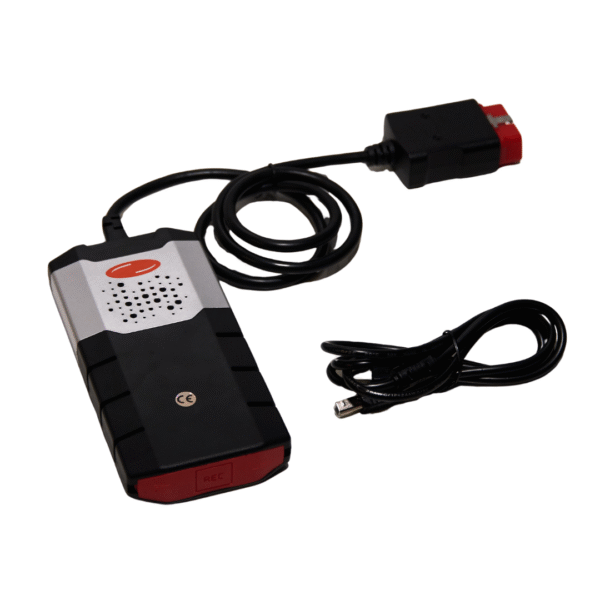 Delfi DS150e 2PCB | Multi Brand Diagnostic ToolDelfi DS150e 2PCB | Multi Brand Diagnostic Tool
This product has multiple variants. The options may be chosen on the product page
Delfi DS150e 2PCB | Multi Brand Diagnostic ToolDelfi DS150e 2PCB | Multi Brand Diagnostic Tool
This product has multiple variants. The options may be chosen on the product page
-
 Universal USB Heated Car Seat Pad – GrayUniversal USB Heated Car Seat Pad – Gray
This product has multiple variants. The options may be chosen on the product page
Universal USB Heated Car Seat Pad – GrayUniversal USB Heated Car Seat Pad – Gray
This product has multiple variants. The options may be chosen on the product page